
Gyaru update

Hey everyone, the Gyaru update is here!
This is our 50th battle pass, so we made it a big one: this season is 50 tiers longer than usual, 150 instead of 100. To make it a little easier to get through, every tier now needs 650 XP instead of 740.
Click the links below to jump straight into what matters most to you:
- 🙏 New role: Prayer (on hold)
- 🏆 Play Games & Game Center achievements
- 💎 Google Play Points rewards
- 🤖 Clan bot permissions
- 🎴 Role Drafting upgrade
- 🎧 Music that keeps playing
- ✨ A fresh look
🙏 New role: Prayer
Update: we are holding this one back. Your feedback made it clear the Prayer does not sit right next to the rest of the Scarecrow tree, so it is not shipping with this update. We are brainstorming how to bring it more in line with the rest of the tree, and it will come back once it does. Everything below is what we had planned.
Say hello to the Prayer, the first advanced role of Scarecrow  .
.
Some of you have met the prayer before: it spent a few months in sandbox last year, then quietly disappeared again without ever being properly released. It got a rework since then, so give the description a read even if you think you know this one. 🙏

During the night the Prayer picks a player to pray for. If that player dies, the prayer ability is replaced by a single-use ability inherited from what their role could do: protection roles pass on Protect, saving one player from an attack during a night, killing roles pass on Kill, taking out a player during any phase, and information roles pass on Reveal, privately uncovering one player’s role during the day. A role that does none of those has nothing to pass on, so the Prayer simply prays for someone new the following night.
🏆 Play Games & Game Center achievements
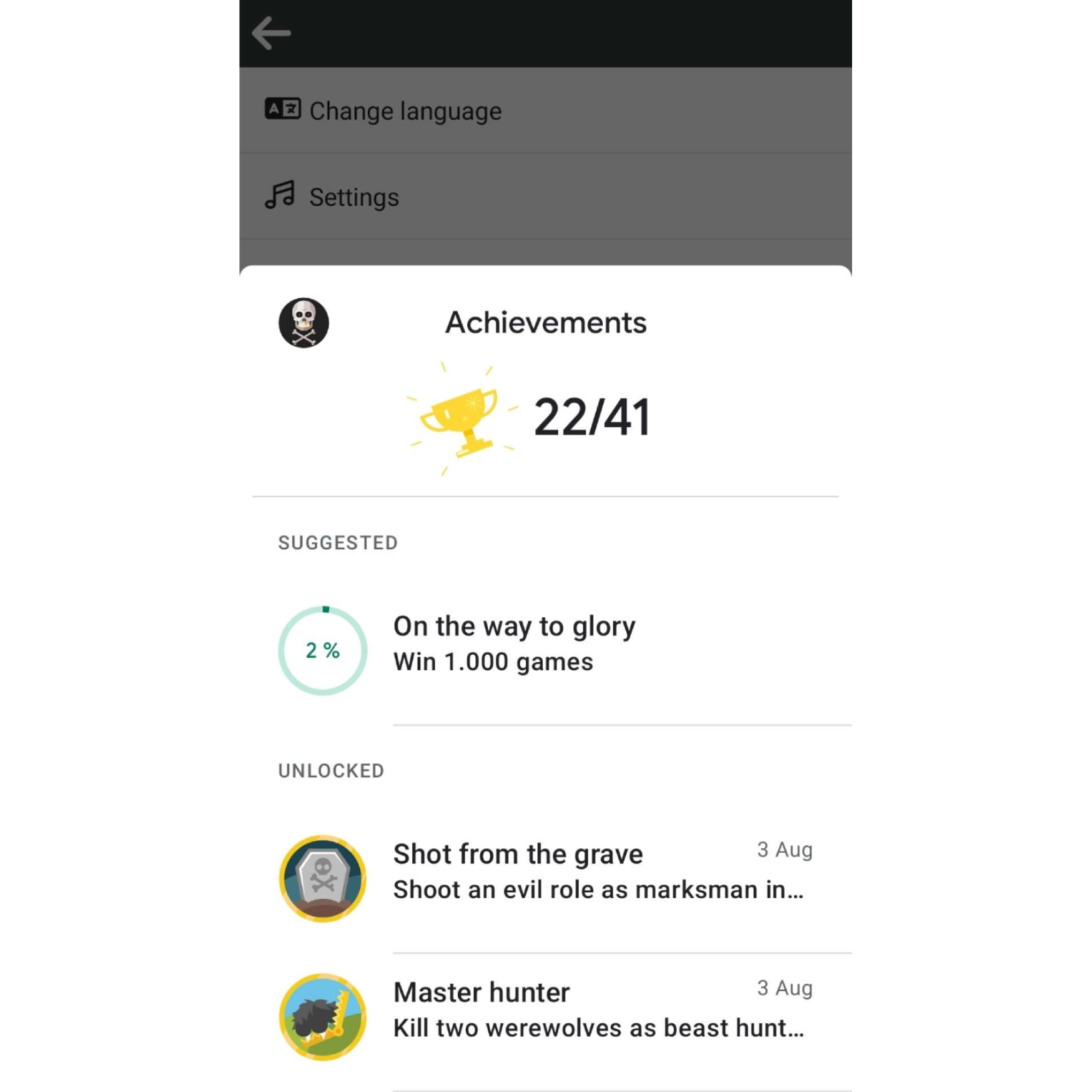
We’re bringing the 41 Steam achievements over to Google Play Games (Android) and Game Center (iOS). Same names, same targets, now on your phone as well. And no, these are not the role achievements on your Wolvesville profile, those are a separate thing and stay exactly as they are.
There’s nothing to set up. If you’re already signed into Game Center or Play Games we link everything up in the background, whatever you’ve earned so far unlocks in one go, and from then on the popup shows up while you play. Not signed in? Android asks you once, and if you say no we won’t nag you about it on every single app start. 😉
Curious how far along you are? On iOS and Android, tap the gear icon in the top right of the main menu and you’ll find a new Achievements entry on the settings screen, right next to highscores. It takes you straight to your Game Center or Play Games achievement list with your current progress.
Your progress also syncs across all three platforms now. No matter where you play, every game counts toward one combined total, and that total is what Steam, Play Games and Game Center each see. So that achievement you happened to earn on your iPhone at some point? It now unlocks on Steam automatically. This part is new for Steam as well, until now your Steam achievements only counted games played on Steam.
Achievements might go live a few days after the rest of the update.
💎 Google Play Points rewards

Wolvesville is joining Google Play Points for the first time, with three avatar items to spend your points on: a Crystal Hat, Crystal Hair and Crystal Eyes. You won’t find them in the shop, redeeming points in the Play Store is the only way to get them. Android only for now 🤖
🤖 Clan bot permissions
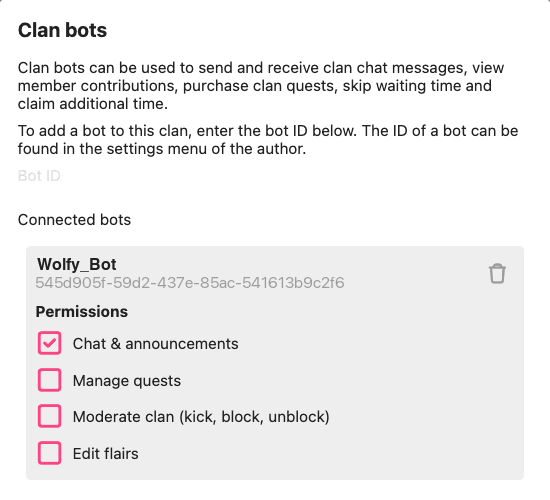
Wolvesville has a public API that allows players to build “Bots” inside Wolvesville. These bots can be invited to clans and modify things inside the clan. This can be fun, but also dangerous if you don’t fully trust a bot. Hence starting with this update you can now control exactly what permissions a bot has inside your clan.
Bots that are already connected are not modified. New bots start with chat only, other permissions can be enabled on demand.
🎴 Role Drafting upgrade
Role Drafting just got a big upgrade. Whether you play the Role Drafting crazy game or a custom game with drafting switched on, we rebuilt the balancing behind it so every drafted game ends up with a fair, playable setup.
Balanced setups, guaranteed. Drafted games now always match the composition of regular games: the right number of werewolves for your lobby size, exactly one info wolf for the pack, a solo killer only in lobbies of 13+, and a village that always has protection, investigative roles and enough power to fight back. Drag the slider to see what a draft guarantees for your lobby size:
Real choices for everyone. Your options now always include a real decision: at least two roles from the same team to choose between, plus a different team to switch to. Players who pick late are no longer stuck with leftover roles that break the game, every role you’re offered fits into the setup that’s already been drafted.
Two at a time. Drafting is faster now, whenever possible two players pick at the same time. Both of you get options that work no matter what the other one chooses, so there’s no way to block each other.
No more duplicate roles. Every role can only be drafted once per game.
Way more roles to draft. 26 roles that could never show up in drafting before are now draftable: Soulbinder  , Ferryman
  , Scarecrow , Party Wolf
  , Firework Wolf
  , Ghost Wolf
  , Shapeshifter
  and the new Prayer
  , plus all 18 event roles like Snatcher Wolf
  , Wolf Magician
  or Snow Angel
  whenever their event is running.
Smarter auto-pick. If your timer runs out, the game now picks the role your team needs most instead of a random one.
Aura balance. Setups now keep a healthy mix of good and unknown auras, so Aura Seer  and Analyst checks stay interesting for both sides.
Report players from the drafting chat. Drafting chat is anonymous, everyone is just “Player 3” or “Player 7”, which sadly also made it a comfortable place for trash talk. Not anymore: the in-game report menu now has a Drafting chat section where you report a player by their number. You can even open the drafting chat again in the report popup, tap a message and report whoever wrote it. This works for the whole game, not just while drafting is running.
🎧 Music that keeps playing
Your podcast, your playlist, that one song you always queue up before a game: until now, opening Wolvesville cut it off. That stops with this update.
Sound effects always mix with whatever else you have playing, so you keep your own audio and still hear the game. Wolvesville’s own background music steps aside instead: it goes quiet while another app is playing something and comes back on its own once that app stops.
Want the game music anyway? While it is paused for another app, the music setting shows a Play anyway button. Tap it and the game music plays over the top until the other app stops on its own.
✨ A fresh look
A batch of screens got rebuilt this season.
New settings screen. No more endless list. Everything sits in categories now, Privacy, Appearance, Layout, Chat, Lobby and Vibration, and most of them come with a live preview: change your chat bubbles and you watch a real conversation update as you tap. Dark mode moved up to a day/night switch right at the top.
New custom game settings. The custom game setup screen got the same treatment, and the timing section now has a bar above the sliders that shows you how long a day and night take at a glance. Drag the sliders and watch it change:
New profile editor. Modernized, and drag and drop throughout: grab any element on your profile and drop it where you want it, same for your avatar slots and your badges. The favorites picker got a search box too.
New avatar preview in the inventory. Swipe left or right to move through your avatar slots, each with its own background. The slot dial above follows along, drag it to sweep across all your slots at once, or tap a tile to jump.
Role cards with an aura. Rare, epic, legendary and mythical role cards now glow with an aura that matches their rarity, both in your collection and when you open them out of a loot box.
As always, please let us know your thoughts and comments, we would love to hear from you! Talk to us on Discord at https://discord.gg/wolvesville
Thank you for reading and happy hunting! 🐺